
Keragon
HIPAA-Compliant Healthcare Automation Platform
Affiliate Disclosure
The link below is an affiliate link. If you sign up, we may earn a commission at no additional cost to you. This does not influence our recommendations — we evaluate all products independently based on our review methodology.
Quick Verdict: Is Keragon Worth It?
Keragon is worth considering if:
- You're a healthcare organization (clinic, practice, digital health company) that needs to automate workflows involving protected health information
- Generic tools like Zapier cannot legally handle your use cases
- The $99/month starting price is justified when HIPAA compliance is non-negotiable
- You lack in-house developers to build custom integrations
Keragon is NOT worth it if:
- Your workflows don't involve PHI
- Your budget is under $150/month
- You need month-to-month flexibility (annual contract required)
- You prefer mature interfaces over healthcare-specific features
The Problem Keragon Solves
Most healthcare organizations operate a fragmented technology stack: an EHR system, intake forms, scheduling software, billing platforms, patient communication tools, and administrative apps. Each system works well independently, but staff spend hours manually transferring data between them.
The typical scenario: front-desk staff copy form responses into the EHR, operations teams track referrals in spreadsheets, managers chase status updates via email, and billing departments manually reconcile appointment data with payment systems. Every manual handoff creates potential for delays, errors, and compliance risk.
General automation platforms like Zapier exist, but they explicitly cannot handle protected health information (PHI) and don't sign Business Associate Agreements (BAAs). This forces healthcare organizations to either avoid automation entirely or fragment workflows across compliant and non-compliant systems—neither option is sustainable.
Keragon's core value proposition
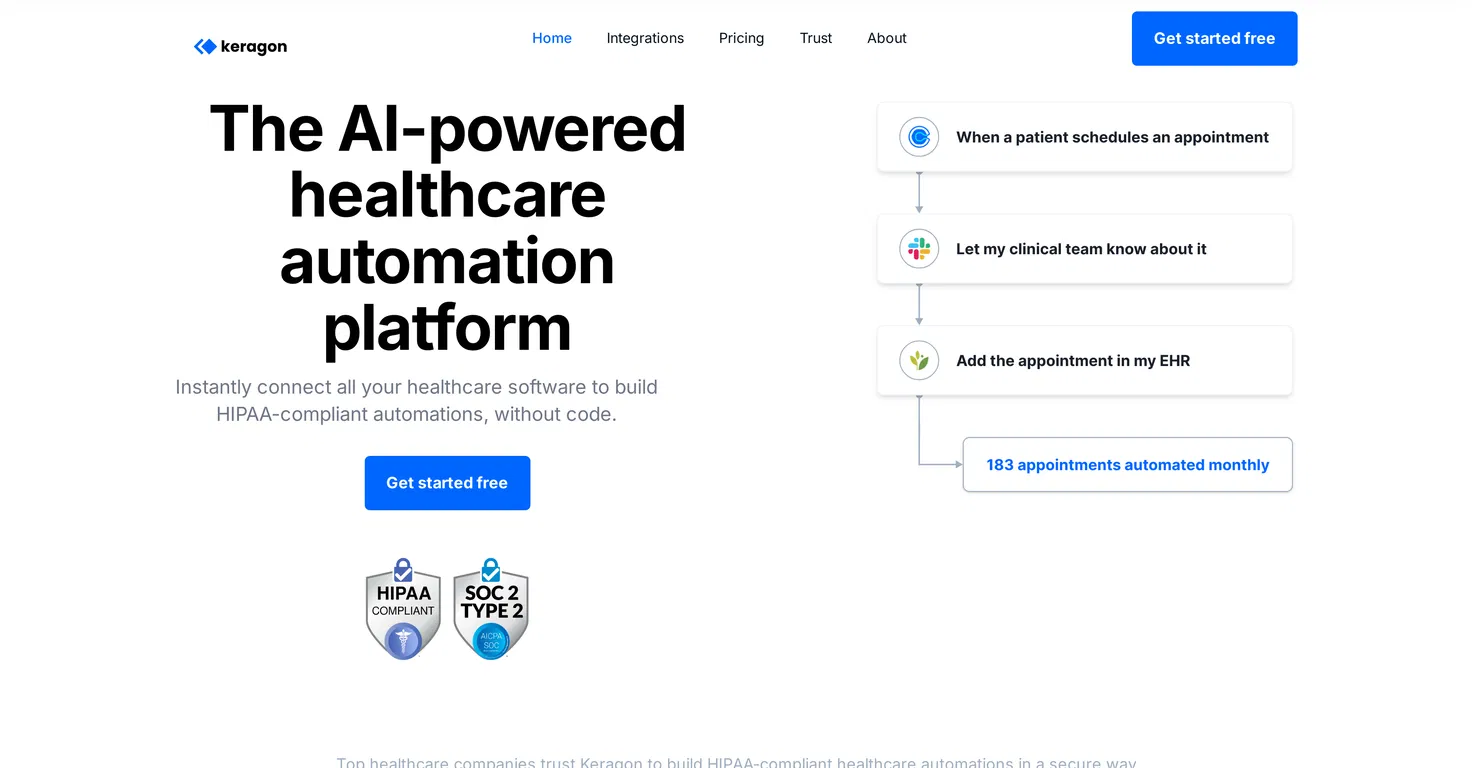
How Keragon Works in Practice
Keragon is one of the few healthcare automation platforms that combines no-code accessibility, comprehensive HIPAA compliance, and extensive EHR integration capabilities at a price point accessible to mid-size organizations.
Keragon operates like other workflow automation platforms—triggers start processes, actions execute steps, conditional logic creates branching paths—but the difference lies in which systems it connects, how it treats PHI, and the support infrastructure around implementation.
Workflow Building Process
The visual workflow builder uses a drag-and-drop interface: select a trigger (new patient form submission, appointment update, EHR record change), then add action blocks (create EHR record, send SMS, update spreadsheet, post Slack notification). Conditional logic allows branching based on patient insurance type, appointment status, or custom criteria.
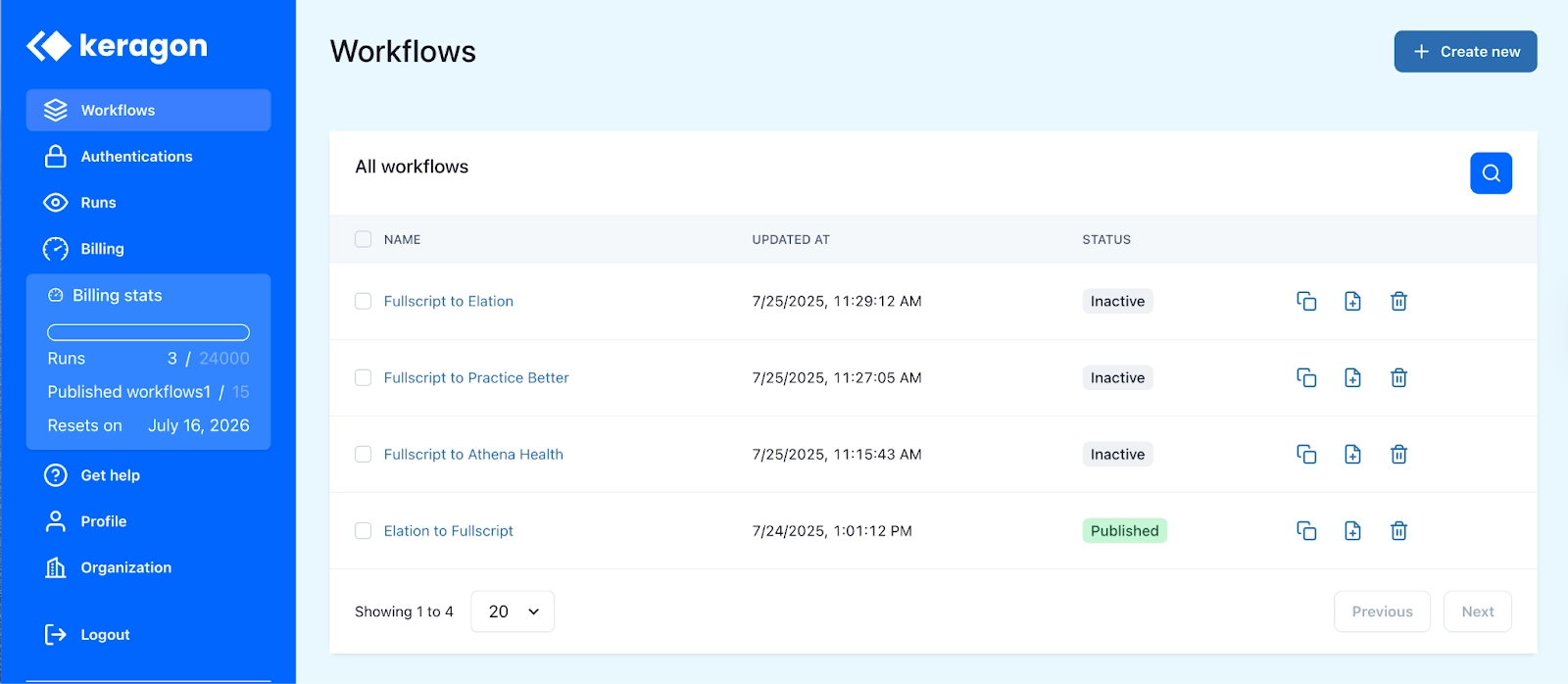
For non-technical staff, this visual approach makes automation logic transparent. When a workflow fails or behaves unexpectedly, operations teams can inspect the sequence themselves rather than waiting for IT support to debug opaque custom scripts.
Integration Ecosystem
Keragon maintains pre-built connectors for major EHR systems (Athenahealth, DrChrono, Elation Health, ModMed, Healthie, Practice EHR), patient intake tools (Jotform, Typeform), communication platforms (Twilio, Slack), and business tools (Google Workspace, Salesforce, Monday.com).
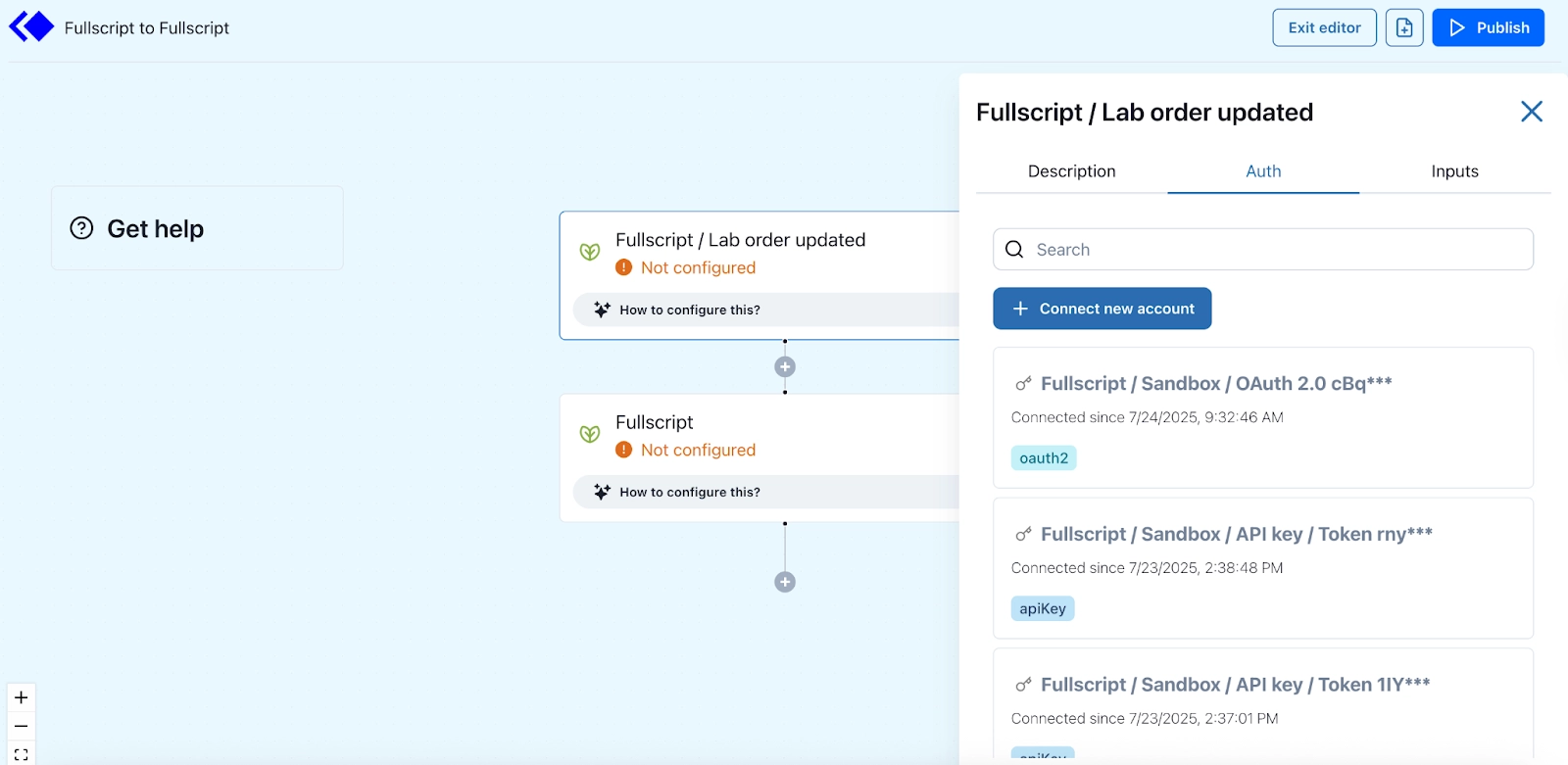
When a required integration doesn't exist, Keragon's support team builds custom connectors in one to two weeks. Multiple verified users cite this responsive connector development as a key differentiator from platforms that only offer self-service integration options.
The Role of Support
User reviews consistently emphasize support quality as Keragon's standout feature. Implementation functions as a collaborative process: healthcare teams describe their messy real-world requirements, and Keragon's staff help map those into workable workflows, sometimes building new connectors or features in direct response.
"Support is incredibly fast, and you can jump on screen shares for help when needed—this is unheard of."
— Verified G2 reviewer
"The support team is next level. They build connectors and think through implementations collaboratively."
— Healthcare consultant
HIPAA Compliance and Security Infrastructure
For any healthcare automation platform review, HIPAA compliance isn't optional—it's the primary factor determining whether the platform can be used at all for clinical workflows.
Compliance Foundations
Keragon was designed from inception for PHI handling. All paid plans include Business Associate Agreements (BAAs), making Keragon legally responsible for protecting patient data according to HIPAA standards. Without a BAA, healthcare organizations accepting one would violate HIPAA regulations.
Security features include:
- AES-256 encryption for data at rest and in transit (TLS 1.3)
- SOC 2 Type II certification with regular external audits
- Role-based access controls and two-factor authentication
- Comprehensive audit logging for regulatory compliance
- Seven-day data retention policy for workflow execution logs
- Regular penetration testing and security assessments
What This Means for Real Workflows
Healthcare teams can design workflows that touch PHI—patient identifiers, intake responses, clinical scheduling data, billing information—without routing that data through non-compliant tools. This enables automations that were previously either prohibited or required extensive compliance workarounds.
Example workflow
Pricing Breakdown and Total Cost of Ownership
Keragon uses tiered subscription pricing based on workflow volume and support level. All paid plans include HIPAA compliance and signed BAAs at no additional cost.
| Plan | Monthly Cost | Workflow Runs | Active Workflows | Support Level | Best For |
|---|---|---|---|---|---|
| Starter | $99/month | 200 runs/month | 3 published workflows | Self-help support | Solo & small private practices |
| ProfessionalPopular | $269/month | 2,000 runs/month | 15 published workflows | Standard support | Small-to-medium practices, young digital health startups |
| Scale Up | $995/month | 20,000 runs/month | 100 published workflows | Priority support | Large healthcare companies, multi-specialty groups |
| Enterprise | Custom pricing | Custom limits | Custom # published workflows | Priority support + dedicated AM | Enterprise healthcare organizations & hospitals |
Hidden Costs and Total Ownership Analysis
Beyond monthly subscription fees, consider:
- Implementation time: Simple workflows can launch in hours; complex multi-system automations may require days or weeks of planning and testing
- Overage fees: Additional workflow runs beyond plan limits cost $0.02 per execution (important for high-volume practices)
- Custom connectors: New integration development typically costs $2,500 one-time fee (though many are built by support team at no charge)
- Staff learning curve: Non-technical teams need 1-2 weeks to become proficient with visual builder for complex workflows
Pricing Comparison Context
At $99/month starting price (Starter plan) or $269/month for most practices (Professional plan), Keragon is competitively priced compared to general automation platforms like Zapier ($19.99-$73.50/month) or Make.com ($9-$29/month). However, this comparison is somewhat misleading because:
- General platforms cannot legally handle PHI, making them unsuitable for clinical workflows
- The alternative to Keragon is typically custom integration development ($10,000-$50,000+ per project) or ongoing manual processes (staff time costs)
- Keragon includes unlimited users, while per-user pricing on other platforms can escalate quickly
User Experience: What Real Customers Say
Based on 19 verified G2 reviews, Keragon maintains a 4.5/5 star rating. User feedback reveals consistent themes across both strengths and limitations.
Positive Feedback Themes
Support Quality (Most Frequently Praised)
"Support is incredibly fast, and you can jump on screen shares for help when needed—this is unheard of."
— Verified G2 reviewer
HIPAA Compliance Solving Real Problems
"We almost shed a tear when we found HIPAA-compliant automations that work smoothly."
— Practice switching from Zapier
Critical Feedback and Limitations
Interface Maturity
"The user interface is still not fully developed or user-friendly."
— Verified G2 reviewer
Learning Curve for Complex Workflows
"The Keragon setup is not easy, but the support is great."
— Multi-location clinic
Documented Results
Case Study: The Autism Center of Illinois (40-employee pediatric therapy provider)
- Time savings: Reclaimed 10 hours per week previously spent on administrative work
- Process improvement: Reduced client onboarding time by 2-3 days
- Implementation: Automated intake pipeline linking IntakeQ, Google Drive, Slack, and Monday.com
Keragon Pros and Cons: Balanced Assessment
Pros
- Healthcare-Native Focus: Built specifically for clinical and administrative workflows, with terminology and data structures that reflect healthcare reality rather than generic business processes
- HIPAA Compliance Built-In: BAAs, SOC 2 certification, encryption, and audit logging included on all paid plans—eliminates the need for compliance workarounds
- Exceptional Support Quality: Consistently praised across all reviews; responsive, collaborative, and willing to build custom connectors
- No-Code Accessibility: Operations staff and practice managers can own workflows without waiting in development queues
- Unlimited Users: No per-seat pricing allows entire teams to collaborate on workflow management
- Responsive Connector Development: Support team builds new integrations in 1-2 weeks when pre-built options don't exist
- 14-Day Free Trial: Full-feature access to test with real workflows before committing
Cons
- Higher Price Point for Scale: $269/month for Professional plan; $995/month for Scale Up may exceed budgets for very small practices
- Interface Maturity: Visual builder is functional but less polished than established platforms; some screens could present information more clearly
- Learning Curve: Complex workflows with branching logic require concentrated effort to configure correctly
- Annual Contract Required: No month-to-month option available (annual commitment only)
- Narrower Connector Catalog: Strong in healthcare-specific tools, but fewer total integrations than general platforms (300+ vs. Zapier's 6,000+)
- Setup Time Investment: Sophisticated multi-system workflows may require days or weeks to plan, test, and deploy
Who Should Use Keragon (and Who Shouldn't)
Keragon Makes Sense For:
- Organizations handling PHI: If workflows touch protected health information, HIPAA compliance is non-negotiable, making Keragon one of few viable options
- Practices with disconnected systems: Teams manually copying data between EHR, intake forms, scheduling, billing, and communication tools
- Organizations without dedicated developers: Operations staff willing to learn a no-code platform can own integrations without technical teams
- Growing healthcare organizations: Multi-location clinics, digital health startups, and practices planning expansion need automation that scales
- Organizations valuing support: Teams that benefit from collaborative implementation assistance rather than pure self-service
Keragon is NOT the Right Fit For:
- Non-PHI workflows: If automation doesn't involve patient data, cheaper general platforms suffice
- Very small budgets: Solo practitioners with under $150/month budget should explore simpler alternatives first
- Month-to-month flexibility needs: Annual contract requirement rules out short-term testing or seasonal use
- Interface perfectionists: Teams expecting mature, polished interfaces matching established platforms will encounter rougher edges
- Connector completeness priority: Organizations needing the absolute broadest possible integration catalog won't find comprehensive coverage
Keragon vs. Alternatives
Zapier (General Automation Platform)
Limited Use CasePricing: $19.99-$73.50/month (significantly cheaper)
Strengths
- 6,000+ apps (far more than Keragon)
- Well-established interface
- Easy to learn
Limitations
- Cannot handle PHI
- Does not sign BAAs
- Explicitly prohibited for clinical workflows
Verdict: Not a viable alternative for workflows involving patient data
Make.com (Advanced Automation)
Limited Use CasePricing: $9-$29/month (much cheaper)
Strengths
- Powerful data transformation
- Visual automation builder
- Great for complex logic
Limitations
- No HIPAA compliance or BAAs
- Cannot handle PHI
Verdict: Excellent for non-healthcare automation; unsuitable for clinical workflows
Workato / Tray.io (Enterprise Integration)
Viable AlternativePricing: Custom (typically $1,000+/month)
Strengths
- Enterprise-grade features
- Extensive customization
- Can support HIPAA with proper setup
Limitations
- Significantly higher cost
- Target larger organizations with technical teams
Verdict: Viable for large healthcare systems; cost-prohibitive for small-mid practices
n8n (Open-Source)
Limited Use CasePricing: Free (self-hosted) or $20+/month (cloud)
Strengths
- Full customization
- No vendor lock-in
- Active developer community
Limitations
- No BAA even for self-hosted
- Organizations must build own HIPAA-compliant infrastructure
Verdict: Requires significant technical investment to achieve compliance
Conclusion: Keragon occupies a specific niche—healthcare-focused, HIPAA-compliant, accessible to non-technical teams. Organizations needing to automate PHI workflows have limited alternatives that match this combination. The relevant comparison is Keragon's subscription cost versus custom integration development ($10,000-$50,000+ per project) or ongoing manual processes (staff time costs).
Implementation Reality: First 30-90 Days
Initial Setup
Week 1-2
- Account configuration and team onboarding (1-2 days)
- Connecting first 2-3 systems (EHR, intake forms, communication tools)
- Building first simple workflow using pre-built templates
- Learning visual builder interface and testing workflow execution
Expected Outcome: First simple workflow running in production
Workflow Refinement
Week 3-4
- Debugging common issues (data field mapping errors, trigger timing)
- Adding conditional logic and branching for more sophisticated scenarios
- Connecting additional systems (billing, project management, cloud storage)
- Training additional team members on workflow maintenance
Expected Outcome: 2-3 workflows operational; team comfortable with basic modifications
Scaling and Optimization
Month 2-3
- Identifying additional automation opportunities based on initial success
- Building more complex multi-step workflows with error handling
- Working with support team on custom connector development if needed
- Monitoring workflow performance and refining trigger conditions
Expected Outcome: 5-10 workflows active; measurable time savings documented
Common Implementation Challenges
- Data field mapping: Ensuring patient data flows correctly between systems with different field structures
- Workflow logic complexity: Complex branching scenarios require careful planning and testing
- Legacy system limitations: Older EHRs may have incomplete APIs or restrictive data access
- Change management: Staff adjustment from manual processes to automated workflows requires training and communication
Final Verdict: Is Keragon Worth It?
Keragon delivers on its core promise: HIPAA-compliant healthcare automation accessible to non-technical teams. The platform successfully solves the fundamental problem of automating workflows involving protected health information without requiring custom development or risking compliance violations.
The Value Equation
Whether Keragon is "worth it" depends entirely on your organization's constraints:
Keragon is worth the investment if:
- You're a healthcare organization with workflows involving PHI
- You currently spend 10+ hours/week on manual data entry between systems
- You lack in-house developers for custom integration work
- You can justify $99-$995/month based on documented time savings
- You value responsive support and collaborative implementation
Keragon is NOT worth it if:
- Your workflows don't touch protected health information
- Your maximum budget is under $200/month
- You need month-to-month flexibility (annual contract required)
- You expect interface maturity matching 10+ year old platforms
Our recommendation: Start with the 14-day free trial focused on one high-impact workflow (patient intake, appointment automation, or billing sync). Document current time spent on manual processes, then measure time saved during trial. This concrete data will justify whether the subscription cost makes sense for your organization's specific situation.
Try Keragon: 14-Day Free Trial
Affiliate Disclosure
The link below is an affiliate link. If you sign up, we may earn a commission at no additional cost to you. This does not influence our recommendations — we evaluate all products independently based on our review methodology.
Keragon
- ✓Full Professional plan features during trial
- ✓No credit card required to start
- ✓Setup assistance from support team included
- ✓Cancel anytime during trial period
- ✓BAA available upon upgrade to paid plan
After trial: $99/month (Starter) or $269/month (Professional)
Contract: Annual commitment required
Frequently Asked Questions

Daniel Harper is a legal consultant focused on healthcare privacy, data protection, and regulatory compliance. He advises clinics, telehealth platforms, and health tech startups on HIPAA compliance and BAAs.
See our review methodology